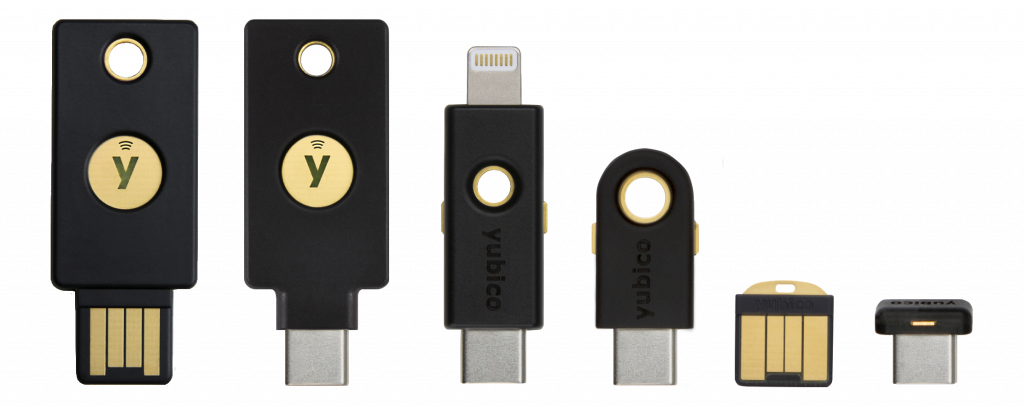
This article describes how to set up YubiKey-based Full Disk Encryption (FDE) on NixOS. The YubiKeys are used as single-factor authentication devices and allow the system to automatically decrypt the disk during boot without user interaction, as long as a key is plugged in.
This is mostly intended as a quick guide for myself and my NixOS configuration repository. It is heavily based on this wiki, which provides a more general guide.
Preparations
Boot the installation medium and set up the environment.
sudo -i
nix-shell https://github.com/sgillespie/nixos-yubikey-luks/archive/master.tar.gz
Set up the YubiKey
⚠️ If your keys are already configured with slot 2 in Challenge-Response mode skip step 1 and 2.
-
If not done already, generate a secret and store it somewhere very safe, it can be used to create new valid keys. Or don’t store it at all, but then you can’t create more keys in the future.
openssl rand -hex 20 -
If not done already, program Configuration Slot 2 of all your YubiKeys in Challenge-Response mode with the generated secret. This overwrites any previous configuration in the slot.
ykpersonalize -2 -ochal-resp -ochal-hmac -a <secret> -
Gather the initial salt.
SALT="$(dd if=/dev/random bs=1 count=16 2>/dev/null | rbtohex)" -
Calculate the initial challenge and response to the YubiKey, remember to plug it in first.
CHALLENGE="$(echo -n $SALT | openssl dgst -binary -sha512 | rbtohex)" RESPONSE=$(ykchalresp -2 -x $CHALLENGE 2>/dev/null) -
Generate the LUKS key.
LUKS_KEY="$(echo | pbkdf2-sha512 64 1000000 $RESPONSE | rbtohex)" -
Test if the key is programmed correctly, challenge the yubikey and check that the response is the expected response previously generated.
ykchalresp -2 -x "$CHALLENGE"
echo "$RESPONSE"
Partitioning
Create a GPT partition table and two partitions on the target disk.
- Partition 1: This will be the EFI system partition: FAT32 etc., >512MB.
- Or use existing boot partition if dual-booting with another OS that is already installed.
- Partition 2: This will be the LUKS-encrypted partition, aka the “LUKS device”.
In the following steps variables are used to refer to the partitions, set them to match your partition setup:
EFI_PART=/dev/<efi_part>
LUKS_PART=/dev/<luks_part>
Setup the LUKS device
-
Create the necessary filesystem on the EFI system partition, and mount it.
mkdir /mnt/boot mkfs.vfat -F 32 -n uefi "$EFI_PART" # Skip this if using an existing boot partition! mount "$EFI_PART" /mnt/boot -
Store the salt and iteration count to the EFI system partition.
mkdir -p "$(dirname /mnt/boot/crypt-storage/default)" echo -ne "$SALT\n1000000" > /mnt/boot/crypt-storage/default -
Create the LUKS device.
echo -n "$LUKS_KEY" | hextorb | cryptsetup luksFormat --cipher=aes-xts-plain64 --key-size=512 --hash=sha512 --key-file=- "$LUKS_PART" -
Open the LUKS device.
echo -n "$LUKS_KEY" | hextorb | cryptsetup luksOpen "$LUKS_PART" encrypted --key-file=-
LVM setup on the LUKS device
-
Setup the LUKS device as a physical volume.
pvcreate /dev/mapper/encrypted -
Setup a volume group on the LUKS device.
vgcreate partitions /dev/mapper/encrypted -
Setup two logical volumes on the LUKS device.
- Volume 1: This will be the swap partition, choose an appropriate size.
- Volume 2: This will be the root partition, rest of the free space.
lvcreate -L 16G -n swap partitions lvcreate -l 100%FREE -n root partitions vgchange -ay # Activate volumes -
Create the filesystems.
mkswap -L swap /dev/partitions/swap
mkfs.ext4 -L root /dev/partitions/root
NixOS installation
-
Mount drives.
umount "$EFI_PART" mount /dev/partitions/root /mnt mkdir /mnt/boot mount "$EFI_PART" /mnt/boot swapon /dev/partitions/swap -
Generate (hardware) config.
nixos-generate-config --root /mnt -
Replace
/mnt/etc/nixos/configuration.nixwith this minimal config and replace all placeholders on the format <…> with appropriate values, there should be 5.{ pkgs, ... }: { imports = [ ./hardware-configuration.nix ]; boot = { initrd = { # Minimal list of modules to use the EFI system partition and the YubiKey kernelModules = [ "vfat" "nls_cp437" "nls_iso8859-1" "usbhid" ]; luks = { yubikeySupport = true; devices."encrypted" = { device = "<LUKS_PART>"; yubikey = { slot = 2; twoFactor = false; gracePeriod = 30; keyLength = 64; saltLength = 16; storage = { device = "<EFI_PART>"; }; }; }; }; }; loader = { efi = { canTouchEfiVariables = true; efiSysMountPoint = "/boot"; }; grub = { enable = true; devices = [ "nodev" ]; efiSupport = true; useOSProber = true; }; }; }; networking = { hostName = "<hostname>"; networkmanager.enable = true; }; users.users.<username> = { isNormalUser = true; extraGroups = [ "wheel" "networkmanager" ]; }; environment.systemPackages = with pkgs; [ vim git ]; console.keyMap = "<keymap>"; # E.g. "sv-latin1" system.stateVersion = "23.11"; } -
Install NixOS.
nixos-install -
Set user password.
nixos-enter --root /mnt -c 'passwd <username>' -
Reboot.
reboot
Install full configuration
After rebooting, sign in to the user, connect to a network using nmtui or
nmcli, and do the following to install the full system configuration.
-
Clone the configuration repository. Add a ssh key (Yubikey SSH), or use https instead.
git clone [email protected]:jonwin1/nixos-jonwin.git cd nixos-jonwin -
Copy one of the host configurations or use an existing one.
cp -r config/desktop config/<hostname> -
Move hardware-configuration.nix into the repo.
sudo mv /etc/nixos/hardware-configuration.nix config/<hostname>/ -
Create an authorization mapping file for YubiKey login and sudo. Plug a key in first, only have one key plugged in at a time when adding multiple keys.
nix-shell -p pam_u2f mkdir -p ~/.config/Yubico pamu2fcfg > ~/.config/Yubico/u2f_keys pamu2fcfg -n >> ~/.config/Yubico/u2f_keys # Add another YubiKey (optional) chmod 600 ~/.config/Yubico/u2f_keys exit -
Edit the configuration files as needed, e.g. set partitions in
config/<hostname>/configuration.nixand add host in flake.nix:... hosts = [ ... + { + user = "<username>"; + hostname = "<hostname>"; + system = "x86_64-linux"; + } ]; ... -
Rebuild, reboot, and done.
git add .
sudo nixos-rebuild switch --flake .#<hostname>
reboot
Add additional keys
Additional keys can be added by programming a new key using the secret that was saved during initial setup. I would recommend having at least two keys to avoid getting locked out.
Reminder: Keep the secret somewhere safe and do not leak it.
-
Become root and setup the dependencies:
sudo -i nix-shell https://github.com/sgillespie/nixos-yubikey-luks/archive/master.tar.gz -
Retrieve the original HMAC-SHA1 secret and program the new YubiKey.
ykpersonalize -2 -ochal-resp -ochal-hmac -a <secret>
Remove lost key
Because all YubiKeys are programmed with the same secret, individual keys cannot be revoked. If a key is lost or compromised, the only way to remove it is to rotate the secret and reconfigure the system and all YubiKeys to use a new one.
⚠️ Make sure at least one working key is available at all times during this process. Losing access to all valid keys will make the data permanently inaccessible.
⚠️ This section has not been properly tested, proceed with caution.
-
Complete the first five steps of the recovery section.
-
Generate a new secret (and optionally save it somewhere safe):
openssl rand -hex 20 -
Reprogram YubiKeys with the new secret:
ykpersonalize -2 -ochal-resp -ochal-hmac -a <new-secret> -
Generate a new salt and derive a new LUKS key.
NEW_SALT="$(dd if=/dev/random bs=1 count=16 2>/dev/null | rbtohex)" NEW_CHALLENGE="$(echo -n $NEW_SALT | openssl dgst -binary -sha512 | rbtohex)" NEW_RESPONSE=$(ykchalresp -2 -x $NEW_CHALLENGE 2>/dev/null) NEW_LUKS_KEY="$(echo | pbkdf2-sha512 64 1000000 $NEW_RESPONSE | rbtohex)" -
Add the new key to the LUKS device:
echo -n "$LUKS_KEY" | hextorb | cryptsetup luksAddKey "$LUKS_PART" <(echo -n "$NEW_LUKS_KEY" | hextorb) --key-file=- -
Update the salt on the EFI system partition:
echo -ne "$NEW_SALT\n1000000" > /boot/crypt-storage/default -
Reboot and verify that the system unlocks correctly using the updated YubiKeys. If it does not work, you should still be able to unlock the system using the old key.
-
Complete the first five steps of the recovery section again.
-
Identify the old key. Find the “Keyslots” section, it will likely have id 0 unless you have added and removed keys before.
cryptsetup luksDump "$LUKS_PART" -
Remove the old key from the LUKS device:
echo -n "$LUKS_KEY" | hextorb | cryptsetup luksRemoveKey <id> $LUKS_PART --key-file=-
After this process, any YubiKey programmed with the old secret will no longer be able to unlock the disk.
Recovery
If the system is broken to the point of being unbootable, the disk can be decrypted and accessed from a live system by following the instructions below. If all keys for LUKS decryption are lost recovery is not possible.
-
Become root and get the dependencies:
sudo -i nix-shell https://github.com/sgillespie/nixos-yubikey-luks/archive/master.tar.gz -
Set the partition variables:
EFI_PART=/dev/<efi_part> LUKS_PART=/dev/<luks_part> -
Get the challenge:
mkdir /mnt/boot mount "$EFI_PART" /mnt/boot CHALLENGE=$(head -n1 /mnt/boot/crypt-storage/default | tr -d '\n' | openssl dgst -binary -sha512 | rbtohex) -
Plug in the YubiKey and get its response to the challenge:
RESPONSE=$(ykchalresp -2 -x $CHALLENGE 2>/dev/null) -
Generate the LUKS key:
LUKS_KEY="$(echo | pbkdf2-sha512 64 1000000 $RESPONSE | rbtohex)" -
Unlock the LUKS device:
echo -n "$LUKS_KEY" | hextorb | cryptsetup luksOpen $LUKS_PART encrypted --key-file=- -
Mount the filesystem:
mount /dev/partitions/root /mnt mkdir /mnt/boot mount "$EFI_PART" /mnt/boot -
You can now enter the system or access the files within:
nixos-enter